Inbound marketing—the strategy of attracting potential customers through valuable content rather than interruptive
advertising—has become a central approach for businesses seeking sustainable growth in digital channels. Unlike
outbound methods that push messages to broad audiences, inbound marketing focuses on creating content that addresses
specific audience needs, optimizing that content for search visibility, and nurturing leads through personalized
communication until they are ready to become customers. This approach requires integrated tools for content
creation, search optimization, social media, email marketing, lead management, and analytics, all working together
within a cohesive platform.
HubSpot has positioned itself as the leading platform for inbound marketing since coining the term “inbound
marketing” through co-founders Brian Halligan and Dharmesh Shah in 2006. What began as a marketing software company
has evolved into a comprehensive customer platform with separate Hubs for Marketing, Sales, Service, Content,
Operations, and Commerce. HubSpot is publicly traded (NYSE: HUBS), serves over 194,000 customers in more than 120
countries, and has become one of the most widely adopted marketing and CRM platforms globally. This article focuses
specifically on the Marketing Hub, examining its features, capabilities, pricing structure, strengths, and
limitations.
This overview is designed to provide a comprehensive, factual assessment of what HubSpot Marketing Hub offers,
helping you evaluate whether it aligns with your organization’s inbound marketing strategy and requirements.
I. Platform Overview and CRM Foundation
The HubSpot Ecosystem
Understanding HubSpot Marketing Hub requires understanding the broader HubSpot ecosystem. At the center of all
HubSpot products is the free CRM (Customer Relationship Management) platform, which serves as the shared database
for all contact, company, deal, and activity data. Every Hub—Marketing, Sales, Service, Content, Operations, and
Commerce—connects to this central CRM, ensuring that all teams have access to the same customer information. This
architectural approach is one of HubSpot’s most significant differentiators, as it eliminates the data silos that
often develop when businesses use separate tools for marketing, sales, and customer service.
The free CRM includes contact management for up to 1,000,000 contacts, company records, deal tracking, task
management, email tracking, meeting scheduling, live chat, and basic reporting. While the CRM is genuinely free to
use, it serves as the foundation that makes HubSpot’s paid Hubs more valuable. The Marketing Hub builds on this CRM
foundation, adding specialized marketing tools for email campaigns, landing pages, social media, advertising,
automation workflows, and analytics.
Who Uses HubSpot Marketing Hub
HubSpot Marketing Hub serves a broad range of organizations, from startups and small businesses using the free or
Starter tier to enterprise organizations managing complex multi-channel marketing operations. The platform is
particularly popular among B2B companies, SaaS businesses, professional service firms, educational institutions, and
media companies. HubSpot’s strong focus on content marketing and lead nurturing makes it especially well-suited for
businesses with longer sales cycles where multiple touchpoints and content interactions influence purchasing
decisions.
Marketing agencies also use HubSpot extensively, with many earning HubSpot Partner certifications. The platform’s
agency-specific features, including client management portals and partner program benefits, have made it a common
recommendation among marketing consultancies. However, businesses of all types can use the platform—the key factor
is whether your marketing strategy aligns with HubSpot’s inbound methodology and whether the platform’s features
match your specific toolset requirements.
II. Core Marketing Features
Email Marketing
HubSpot’s email marketing tools allow users to create, send, and analyze email campaigns with deep CRM integration.
The email editor uses a drag-and-drop builder with customizable templates, allowing marketers to create professional
emails without design or coding skills. Emails can be personalized using any CRM property—not just name and company,
but also lifecycle stage, lead score, recent page views, form submissions, or any custom property stored in the
contact’s record. This level of personalization goes beyond what most standalone email platforms offer because
HubSpot draws from the full CRM database.
Email features include A/B testing for subject lines and content, smart send time optimization based on recipient
behavior patterns, automated follow-up sequences, list segmentation based on CRM properties and behavioral data,
deliverability tools, and detailed analytics showing open rates, click rates, engagement over time, and revenue
attribution. HubSpot also provides a built-in email health dashboard that monitors bounce rates, spam complaints,
and delivery rates to help maintain sender reputation.
Landing Pages and Forms
The Marketing Hub includes a landing page builder that allows creating conversion-optimized pages without developer
involvement. The drag-and-drop editor provides templates for various purposes including lead generation, webinar
registration, ebook downloads, and event signups. Landing pages can include smart content that displays different
messaging based on visitor characteristics, such as showing different content to first-time visitors versus
returning leads or varying messaging based on the visitor’s industry or lifecycle stage.
HubSpot’s form builder creates forms that automatically sync data to the CRM upon submission. Forms support
progressive profiling, which presents different questions to returning visitors who have already provided basic
information, gradually building a more complete contact profile over multiple interactions. Forms can be embedded on
HubSpot-hosted pages, external websites, or displayed as pop-ups and slide-ins based on configurable triggers like
time on page, scroll depth, or exit intent.
Blog and Content Tools
HubSpot provides a built-in blogging platform with SEO optimization tools, including keyword recommendations,
readability analysis, and on-page SEO suggestions. The blog editor supports collaborative drafting with commenting
and approval workflows, scheduled publishing, and AMP (Accelerated Mobile Pages) support. Content strategy tools
include a topic cluster feature that helps organize content around pillar pages and supporting blog posts,
reflecting modern SEO best practices for topical authority.
Social Media Management
The Marketing Hub includes social media publishing and monitoring tools that allow teams to schedule posts across
Facebook, Instagram, LinkedIn, and X (Twitter) from within the HubSpot interface. Posts can be scheduled
individually or as part of campaign workflows. The social media tools also include a monitoring inbox for tracking
mentions, keywords, and engagement, allowing teams to respond to social interactions without switching to separate
platforms.
Social media analytics track engagement metrics for published content and provide reporting on how social media
activity contributes to website traffic, lead generation, and customer acquisition. Because social media data is
connected to the CRM, HubSpot can associate social interactions with specific contacts and track the full journey
from social engagement to lead conversion.
III. Marketing Automation
Workflow Builder
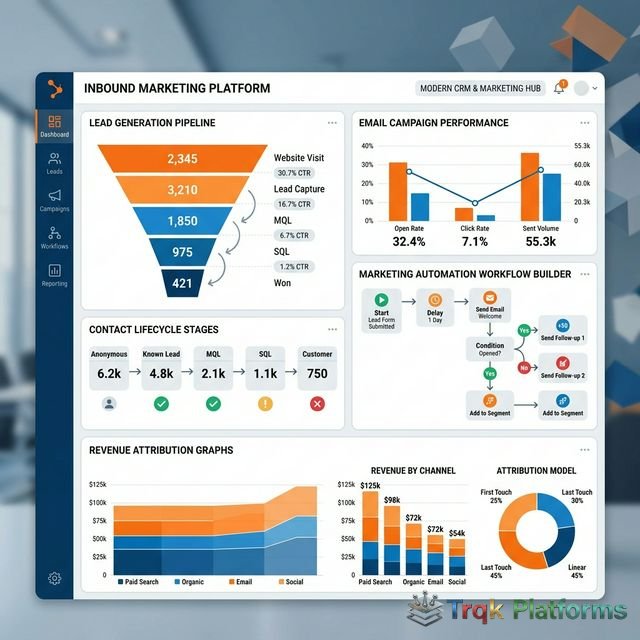
Marketing automation is one of HubSpot Marketing Hub’s strongest capabilities. The visual workflow builder allows
marketers to create automated sequences triggered by contact actions, property changes, list membership, date-based
conditions, and more. Workflows can include delays, conditional branches (if/then logic), goal criteria, and
multiple action types including sending emails, updating contact properties, creating tasks for sales teams,
enrolling contacts in other workflows, setting lead scores, and triggering internal notifications.
Common workflow applications include lead nurturing sequences that guide new leads through educational content over
days or weeks, lead scoring automation that increases or decreases a contact’s score based on engagement behavior,
lifecycle stage management that automatically moves contacts through marketing-qualified lead (MQL) to
sales-qualified lead (SQL) stages, re-engagement campaigns for inactive contacts, and customer onboarding sequences.
The visual builder makes it possible for non-technical users to create complex multi-step automations, though
planning the logic carefully before building is important for effective implementation.
Lead Scoring
HubSpot’s lead scoring feature assigns numerical values to contacts based on their attributes and behaviors. Positive
scores can be added for actions like visiting key pages, downloading content, opening emails, or matching ideal
customer profile criteria. Negative scores can be applied for factors like unsubscribing from emails, visiting a
careers page (indicating they may be a job seeker rather than a prospect), or coming from a non-target industry.
Lead scores help marketing teams prioritize leads for sales handoff and can trigger automated actions when scores
reach specific thresholds.
IV. Advertising and Paid Media
Ad Management
HubSpot integrates with Google Ads, Facebook Ads, Instagram Ads, and LinkedIn Ads, allowing users to create and
manage advertising campaigns from within the platform. The key advantage of managing ads through HubSpot is the
connection to CRM data, which enables audience creation based on contact lists and CRM properties, conversion
tracking that follows leads from ad click through to customer status, ROI reporting that connects ad spend to actual
revenue generated, and retargeting campaigns based on website behavior and CRM segmentation.
This closed-loop reporting between advertising and CRM data helps marketers understand not just which ads generate
clicks, but which ads generate customers and revenue—a level of attribution that is difficult to achieve when
advertising platforms and CRM systems are not connected.
V. Integrations and App Marketplace
App Marketplace
HubSpot’s App Marketplace contains over 1,500 integrations with third-party tools across categories including CRM, e-commerce, analytics, customer support, communications, project management, and more. Notable integrations include Salesforce for organizations using it as their primary CRM, Slack for internal team notifications triggered by marketing events, Zoom and GoToWebinar for webinar registration and attendance tracking that feeds directly into the CRM, Shopify and WooCommerce for connecting e-commerce activity with marketing automation, WordPress for users hosting their blog externally, Google Workspace and Microsoft 365 for productivity integration, and various accounting and ERP platforms for financial data connectivity.
HubSpot also provides a robust API for custom integrations, enabling developers to connect HubSpot data with internal systems, proprietary tools, or applications not available in the marketplace. The API supports contact management, deal tracking, email sends, workflow triggers, and custom object manipulation, making it possible to extend HubSpot functionality to meet specialized requirements that standard integrations do not cover. SDKs are available in multiple programming languages, and extensive API documentation with code samples helps reduce development time for custom integration projects.
Native Integration Advantages
A key advantage of using HubSpot’s native tools over third-party integrations is data consistency and completeness. When all marketing activities including email campaigns, landing pages, forms, social media, advertising, and blog content run through HubSpot natively, every interaction is automatically logged in the contact’s CRM timeline without any additional configuration. This creates a comprehensive view of each contact’s journey from first touch to customer conversion without the data synchronization delays, field mapping issues, missing data points, or API rate limits that can occur with external integrations. For organizations that value a unified data environment and seamless cross-channel attribution, this native integration approach is one of the most compelling reasons to adopt HubSpot as their primary marketing platform.
VI. Analytics and Reporting
Marketing Analytics
HubSpot provides comprehensive marketing analytics that cover website traffic, email performance, social media
engagement, landing page conversion rates, and campaign performance. The analytics dashboard is customizable,
allowing users to create views focused on the metrics most relevant to their objectives. Attribution reporting is
available on Professional and Enterprise plans, offering multiple attribution models (first touch, last touch,
linear, time decay, U-shaped, W-shaped) to understand which marketing activities contribute to conversion at
different stages of the customer journey.
Custom Reports and Dashboards
The reporting tools allow creation of custom reports combining marketing, sales, and service data from the shared
CRM. Reports can visualize data using various chart types, be filtered by date ranges and contact properties, and be
assembled into shareable dashboards. The ability to create cross-functional reports that connect marketing
activities to sales outcomes is particularly valuable for demonstrating marketing’s contribution to revenue.
VII. Pricing Structure
HubSpot Marketing Hub is available in four tiers, each with progressively more features and higher contact limits. As
of early 2026:
| Tier | Monthly Price | Marketing Contacts | Key Features |
|---|---|---|---|
| Free | $0 | N/A (CRM only) | Email marketing (2,000/month), forms, live chat, basic reporting |
| Starter | ~$20/month | 1,000 | Remove HubSpot branding, email automation, ad retargeting |
| Professional | ~$890/month | 2,000 | Full automation, A/B testing, SEO, social media, custom reporting |
| Enterprise | ~$3,600/month | 10,000 | Advanced reporting, adaptive testing, custom objects, revenue attribution |
A notable aspect of HubSpot’s pricing is the significant jump between Starter ($20/month) and Professional
($890/month). Many of the platform’s most powerful features—including marketing automation workflows, A/B testing,
blog tools, social media management, and SEO tools—are only available starting at the Professional tier. This
pricing gap means that businesses seeking comprehensive marketing automation capabilities need to be prepared for a
meaningful investment. Additional marketing contacts beyond the included amount incur extra monthly charges.
Pricing accurate as of early 2026 — verify current rates on the official HubSpot website.
VIII. Strengths and Limitations
Strengths
- Unified CRM foundation eliminates data silos between marketing, sales, and service
- Powerful visual workflow builder for complex marketing automation
- Comprehensive inbound marketing toolset in a single platform
- Free CRM and Starter tier provide accessible entry points
- Strong content and SEO tools built into the marketing workflow
- Closed-loop reporting connecting marketing activities to revenue
- Extensive integration marketplace with 1,500+ third-party apps
- HubSpot Academy provides free certifications and educational content
- Active community and partner ecosystem for support
Limitations
- Significant price jump from Starter to Professional creates a gap for mid-stage businesses
- Many core marketing features require the Professional tier at $890+/month
- Template design customization can be limiting compared to dedicated design tools
- Social media features are less comprehensive than dedicated social management platforms
- Annual contracts are required for Professional and Enterprise tiers
- Onboarding fees are mandatory for Professional ($3,000) and Enterprise ($6,000) plans
- The platform’s extensive feature set can feel complex for small teams
- Contact-based pricing means costs scale as your database grows
IX. Alternatives to Consider
Several platforms compete with HubSpot Marketing Hub across different segments of the market. ActiveCampaign offers
robust email marketing and automation capabilities at lower price points, making it attractive for businesses that
prioritize email workflows over HubSpot’s broader feature set. Marketo Engage (now part of Adobe) is an
enterprise-grade marketing automation platform with more advanced lead management and account-based marketing
capabilities, though at a significantly higher cost and complexity level. Pardot (now Marketing Cloud Account
Engagement by Salesforce) integrates deeply with the Salesforce CRM ecosystem and is popular among organizations
already committed to Salesforce. Mailchimp provides a more accessible and affordable alternative for businesses
primarily focused on email marketing and basic automation. Brevo offers competitive pricing with a growing feature
set that includes email, SMS, and chat capabilities.
X. Conclusion
HubSpot Marketing Hub stands out as one of the most comprehensive inbound marketing platforms available, offering an
integrated suite of tools for content creation, email marketing, social media, advertising, automation, and
analytics—all built on a shared CRM foundation that connects marketing activities to business outcomes. The
platform’s strength lies in this integration, enabling closed-loop reporting and seamless data flow between
marketing, sales, and service teams.
For businesses committed to an inbound marketing strategy and willing to invest in the Professional tier, HubSpot
provides a powerful, unified platform that can replace multiple standalone tools. However, the significant pricing
gap between Starter and Professional plans means that smaller businesses need to carefully evaluate whether
HubSpot’s mid-tier capabilities justify the investment compared to assembling individual tools that may collectively
cost less. The free CRM and Starter tier offer a practical starting point for testing the platform before committing
to a larger investment, and HubSpot Academy’s free educational resources provide valuable training regardless of
which tier you ultimately choose.
About The Publisher

TRQK Platforms Editor
The TRQK Editorial Team meticulously investigates and evaluates the world's most powerful digital platforms. Our mission is to provide transparent, in-depth reviews that empower businesses to scale with the right technology.