Traditional web analytics platforms like Google Analytics provide essential data about what happens on your
website—page views, bounce rates, traffic sources, and conversion rates. However, they tell you what happened
without fully explaining why it happened. When a landing page has a high bounce rate, standard analytics can confirm
the problem but cannot show whether users are confused by the layout, unable to find the call-to-action button,
distracted by irrelevant content, or encountering a technical issue that prevents them from progressing.
Understanding user behavior at this granular level requires a different type of analytics tool—one that captures how
real users actually interact with your pages.
Hotjar is a behavioral analytics and user feedback platform that fills this gap by providing visual tools that show
how users experience your website. Founded in 2014 by David Darmanin in Malta, Hotjar has grown to serve over 1.2
million websites in 180+ countries, making it one of the most widely adopted user experience analytics platforms in
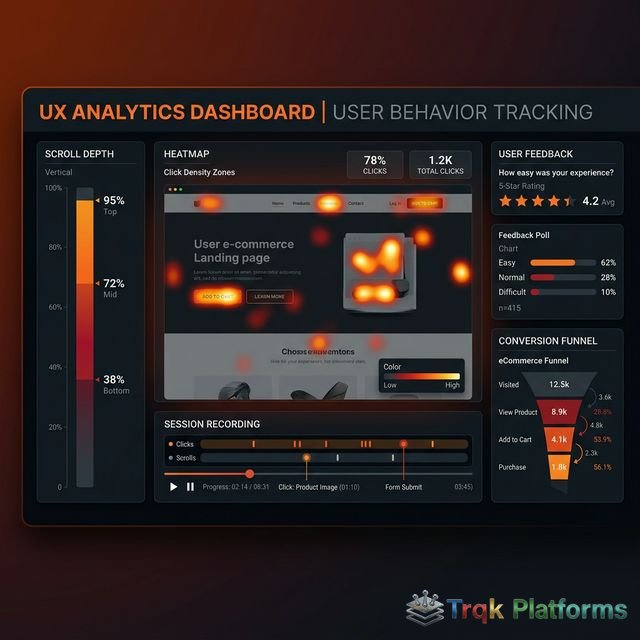
the world. The platform provides heatmaps that visualize where users click, scroll, and move their cursors, session
recordings that replay individual user visits, feedback widgets that collect user opinions directly, surveys for
structured user research, and funnel and form analysis tools that identify where users drop off in conversion
processes.
This article provides a comprehensive overview of Hotjar’s features, tools, data privacy approach, pricing structure,
strengths, and limitations. The goal is to present a detailed, factual assessment that helps you evaluate whether
Hotjar aligns with your website optimization and user experience research needs.
I. Platform Overview and Core Concept
Behavioral Analytics vs. Traditional Analytics
Understanding Hotjar’s value proposition requires understanding the distinction between quantitative and qualitative
analytics. Traditional analytics tools like Google Analytics provide quantitative data—numbers, percentages, and
counts that measure what users do in aggregate. Hotjar provides qualitative data—visual, observational evidence of
how individual users behave on your website. The two types of data are complementary, not competitive. Google
Analytics might tell you that 70% of users leave your pricing page without converting. Hotjar shows you that most of
those users scroll past the pricing table without stopping, or that they click on an element that is not actually
clickable, or that they hover over a FAQ section that does not exist. This qualitative understanding of user
behavior enables specific, actionable website improvements that aggregate data alone cannot inform.
How Hotjar Collects Data
Hotjar works by adding a JavaScript tracking code to your website, similar to how Google Analytics and other
analytics tools are installed. Once the code is in place, Hotjar captures user interaction data including mouse
movements, clicks, taps (on mobile), scrolling behavior, and form interactions. This data is processed to generate
heatmaps, recorded as session replays, and combined with direct user feedback collected through on-site surveys and
feedback widgets. Hotjar is designed to have minimal impact on website performance, with the tracking script loading
asynchronously and data processing occurring on Hotjar’s servers rather than in the user’s browser.
II. Heatmaps
Types of Heatmaps
Heatmaps are visual representations of user behavior that use color gradients (typically from blue/cool for low
activity to red/hot for high activity) to show where user attention and interaction concentrate on a page. Hotjar
provides three types of heatmaps:
| Heatmap Type | What It Tracks | Key Insights |
|---|---|---|
| Click Maps | Where users click or tap on a page | Which elements attract clicks, dead clicks on non-clickable elements |
| Move Maps | Where users move their mouse cursor | Areas of interest, reading patterns, attention distribution |
| Scroll Maps | How far users scroll down a page | Content visibility, fold line, where users lose interest |
Practical Applications of Heatmaps
Click maps reveal whether users are clicking on the elements you want them to interact with, whether users are
clicking on non-interactive elements (indicating design confusion), and which calls-to-action receive the most
attention. Move maps show where users focus their attention as they browse a page, which can indicate reading
patterns and areas of interest. Scroll maps show the percentage of visitors who see each section of a page, which is
critical for determining whether important content or conversion elements are placed above or below the point where
most users stop scrolling. For long-form content like articles and landing pages, scroll maps can show whether users
are reading to the end or dropping off at specific points.
Heatmaps are particularly valuable for A/B test analysis, landing page optimization, navigation design evaluation,
content placement decisions, and understanding mobile versus desktop behavior differences. By comparing heatmaps
before and after design changes, teams can visually confirm whether modifications achieved the intended behavior
changes.
III. Session Recordings
How Session Recordings Work
Session recordings capture and replay individual user visits to your website, showing mouse movements, clicks,
scrolling, page navigation, and form interactions in real time (or at increased playback speed). Each recording
represents one visitor’s complete interaction with your site during a single session, providing a first-person view
of the user experience that reveals usability issues, confusion points, and behavioral patterns that aggregate data
cannot expose.
Recordings can be filtered by various criteria including page URL, country, device type, browser, operating system,
duration, number of pages visited, and custom events. This filtering is essential for efficient analysis because
watching recordings without focus can be time-consuming. For example, you can filter for recordings where users
visited the checkout page but did not complete a purchase, narrowing your review to the specific sessions most
likely to reveal conversion obstacles.
Key Use Cases for Session Recordings
Common applications of session recordings include identifying usability problems that cause frustration or confusion,
understanding why users abandon forms or checkout processes, evaluating whether design changes improve or hinder
user experience, debugging unexpected user behavior that analytics data flags but cannot explain, validating
assumptions about how users navigate between pages, and building empathy for user experience among design and
development teams. Watching even a small number of representative recordings can provide insights that hours of data
analysis might miss, because they reveal the qualitative reality of how actual people interact with your interface.
IV. Feedback and Surveys
Feedback Widget
Hotjar’s Feedback widget places a small, unobtrusive button on your website (typically labeled “Feedback” on the side
of the page) that visitors can click to share their thoughts. The widget can include an emoji-based satisfaction
rating, a text field for open-ended comments, and an optional screenshot tool that lets users highlight specific
page elements they are commenting on. This passive feedback collection captures user opinions at the moment of
experience, providing qualitative insights that are often more authentic and specific than responses gathered
through separate email surveys or focus groups.
Surveys
Hotjar Surveys support more structured user research through on-site pop-up surveys and external link-based surveys.
Survey question types include multiple choice, rating scales (numerical and emoji), open-ended text responses, Net
Promoter Score (NPS), and ranking questions. Surveys can be triggered based on various conditions including page
URL, time on page, scroll depth, exit intent, and specific user actions. This targeting capability allows teams to
ask the right questions at the right moment—for example, displaying a satisfaction survey after a user completes a
purchase, or asking for feedback when a user appears to be about to leave the site.
Survey responses are aggregated in a dashboard with visualizations for quantitative responses and a searchable feed
for open-ended text answers. AI-powered summaries help identify common themes in text responses without requiring
manual review of every individual answer.
V. Funnels and Form Analysis
Funnel Analysis
Hotjar’s Funnels feature tracks user progression through multi-step conversion processes, showing the percentage of
users who complete each step and where the largest drop-offs occur. Funnels can be configured for any sequence of
pages—such as product page, cart, checkout details, payment, and confirmation—providing a clear view of conversion
bottleneck locations. When a funnel reveals significant drop-off at a specific step, teams can combine this data
with heatmaps and session recordings for that specific page to understand why users are leaving and what
improvements might reduce abandonment.
Form Analysis
The Form Analysis tool provides detailed interaction data for specific forms on your website, including which fields
take the longest to complete, which fields cause the most abandonment (users leaving the form while filling out that
particular field), how many users interact with each field, and the overall form completion and conversion rates.
This field-level analysis helps identify specific form elements that create friction—perhaps a confusing field
label, a field that requires information users find uncomfortable providing, or a validation error message that
frustrates users into abandoning the process.
VI. User Interviews and Engage
Hotjar Engage
Hotjar Engage (formerly known as Hotjar Ask) facilitates live user interviews and moderated research sessions. The
tool helps teams recruit participants from their own website audience or from Hotjar’s participant panel, schedule
interview sessions, conduct video calls with screen sharing, and record sessions for later review. This capability
extends Hotjar beyond passive observation into active user research, enabling teams to ask follow-up questions,
explore user motivations, and get detailed verbal feedback about specific design decisions or product features.
While not a replacement for dedicated user research platforms used by large UX teams, Hotjar Engage provides a
convenient, integrated option for teams that want to add moderated research to their optimization process without
adopting separate tools.
VII. Data Privacy and Compliance
Privacy-First Approach
Hotjar has made data privacy a central element of its platform design. The tool automatically suppresses sensitive
information in session recordings and heatmaps, hiding text inputs in forms by default so that personal information
like names, email addresses, passwords, and payment details are not captured. Users can configure additional
suppression rules for specific page elements. Hotjar does not capture keystrokes by default and provides granular
controls for determining what data is collected.
The platform is designed for compliance with GDPR, CCPA, and other privacy regulations, offering features including
consent management integration (compatible with major consent management platforms), data retention controls, user
data deletion capabilities, and Data Processing Agreements (DPAs). Hotjar stores data on EU-based servers and has
obtained SOC 2 Type II certification, which validates its security controls and practices. For website owners
concerned about user privacy while collecting behavioral data, Hotjar’s privacy-first design approach addresses many
common compliance requirements.
VIII. Pricing Structure
Hotjar offers separate pricing for its Observe (heatmaps and recordings) and Ask (surveys and feedback) products as
of early 2026:
| Plan | Observe (Heatmaps/Recordings) |
Ask (Surveys/Feedback) |
|---|---|---|
| Basic | Free — 35 daily sessions | Free — 20 monthly responses |
| Plus | ~$40/month — 100 daily sessions | ~$48/month — 250 monthly responses |
| Business | ~$100/month — 500 daily sessions | ~$64/month — 500 monthly responses |
| Scale | Starting ~$213/month — unlimited sessions | Starting ~$128/month — unlimited responses |
Hotjar’s free Basic plan is notably generous for small websites, providing enough sessions and responses for initial
testing and small-scale optimization. The paid plans scale based on data volume needs. Observe and Ask products can
be subscribed to independently, allowing users to choose only the features they need. Hotjar Engage (user
interviews) has its own separate pricing starting with a free tier that includes limited sessions per month.
Pricing accurate as of early 2026 — verify current rates on the official Hotjar website.
Integrations with Other Platforms
Hotjar integrates with a wide range of web development, analytics, and marketing platforms to fit into existing technology stacks. Key integrations include Google Analytics for connecting behavioral insights with traffic and conversion data, Google Optimize and Optimizely for connecting heatmap and recording data with A/B test experiments, HubSpot and Salesforce for connecting user feedback with CRM records, Slack and Microsoft Teams for receiving survey response notifications in team channels, Zapier for creating automated workflows triggered by survey responses or feedback submissions, and major CMS platforms including WordPress, Shopify, and Wix for streamlined installation and tracking setup.
The platform also provides a JavaScript Events API that allows developers to trigger recordings and surveys based on custom events, such as button clicks, form submissions, or specific user actions. This programmatic control enables more targeted data collection, ensuring that recordings and surveys capture the specific user interactions most relevant to optimization goals rather than collecting data indiscriminately across all sessions.
Trends and Dashboards
Hotjar Trends provides aggregated behavioral metrics over time, including engagement scores, rage click rates, U-turn rates (users who navigate to a page and immediately return), and session completion metrics. These trends help teams identify emerging usability patterns, measure the impact of design changes on user behavior, and track whether user experience is improving or degrading over time. Combined with the granular detail available through individual session recordings and heatmaps, Trends provides the high-level monitoring layer that ensures teams notice behavioral shifts before they significantly impact conversion rates or user satisfaction metrics.
IX. Strengths and Limitations
Strengths
- Visual, intuitive heatmaps make behavioral data accessible to non-technical users
- Session recordings reveal the qualitative reality of user experience
- Generous free tier allows meaningful testing before commitment
- Privacy-first design with automatic PII suppression and GDPR compliance
- On-site surveys and feedback widgets capture opinions at the moment of experience
- Form analysis identifies specific fields causing user abandonment
- Minimal website performance impact from the tracking script
- Easy integration with major CMS platforms, analytics tools, and A/B testing tools
- AI-powered survey response summaries save manual analysis time
- Hotjar Engage adds moderated user research capabilities
Limitations
- Session-based pricing means high-traffic sites may need expensive plans
- Heatmap accuracy depends on sufficient sample size to be statistically meaningful
- Session recordings require time investment to watch and analyze manually
- Limited integration with advanced analytics and data warehouse platforms
- Real-time data is limited—most reports are based on collected session data
- No built-in A/B testing capabilities—requires integration with testing platforms
- Move maps may not accurately represent eye tracking or true visual attention
- Single-page application (SPA) tracking requires additional configuration
X. Alternatives to Consider
The behavioral analytics space includes several alternatives worth evaluating. Microsoft Clarity is a free tool from
Microsoft that provides heatmaps, session recordings, and behavioral insights without session limits, making it an
attractive option for budget-conscious teams, though its feature set is less comprehensive than Hotjar’s. FullStory
provides enterprise-grade session replay and digital experience analytics with advanced search and segmentation
capabilities, at a significantly higher price point. Mouseflow offers heatmaps, session recordings, and form
analytics with features similar to Hotjar, including attention heatmaps and geo-based filtering. Lucky Orange
combines heatmaps and session recordings with live chat and conversion funnels. Crazy Egg, created by marketing
expert Neil Patel, offers heatmaps and A/B testing tools with a focus on conversion optimization. Contentsquare
(which acquired Hotjar in 2023) provides enterprise digital experience analytics with AI-powered insights for large
organizations. For teams needing dedicated survey and user feedback tools, platforms like Qualtrics, SurveyMonkey,
and Typeform offer more advanced survey design and analysis capabilities than Hotjar’s built-in survey tools.
XI. Conclusion
Hotjar has established itself as one of the most accessible and widely used behavioral analytics platforms by making
qualitative user experience data visual, understandable, and actionable for teams of all sizes and technical
backgrounds. The combination of heatmaps, session recordings, on-site feedback collection, surveys, and form
analysis in a single platform provides a comprehensive toolkit for understanding not just what users do on your
website, but why they do it and where their experience can be improved.
The platform delivers the most value when used as a complement to traditional analytics tools like Google Analytics.
While GA tells you which pages have high bounce rates, Hotjar shows you the specific user behaviors contributing to
those bounces. This combination of quantitative and qualitative data creates a complete picture that enables more
effective website optimization, better design decisions, and ultimately improved user experiences that translate
into higher conversion rates and better business outcomes. For teams beginning their user experience optimization
journey, Hotjar’s generous free tier provides a practical, risk-free starting point for discovering the insights
that behavioral analytics can provide.
About The Publisher

TRQK Platforms Editor
The TRQK Editorial Team meticulously investigates and evaluates the world's most powerful digital platforms. Our mission is to provide transparent, in-depth reviews that empower businesses to scale with the right technology.