Understanding how Google discovers, crawls, indexes, and displays your website in search results is foundational to
any effective search engine optimization strategy. While third-party SEO tools provide valuable competitive data and
keyword research capabilities, only Google itself can provide authoritative, first-party data about how your website
actually performs in its search engine. Google Search Console (GSC) is the platform that provides this direct line
of communication between website owners and Google’s search infrastructure, offering data, reports, and tools that
are unavailable from any other source.
Google Search Console, previously known as Google Webmaster Tools, is a free platform provided by Google for anyone
who manages a website. The platform serves two primary purposes: providing website performance data in Google Search
(queries, clicks, impressions, and ranking positions) and surfacing technical issues that may affect how Google
crawls and indexes your website. GSC has evolved significantly since its early days, with major updates in 2018 that
redesigned the interface, expanded data retention, and introduced new reporting capabilities including Core Web
Vitals monitoring and enhanced URL inspection. The platform is used by individual website owners, SEO professionals,
web developers, digital marketing agencies, and enterprise organizations worldwide.
This guide provides a comprehensive overview of Google Search Console’s features, reports, configuration options, and
practical applications. We cover search performance analysis, index coverage, URL inspection, sitemap management,
Core Web Vitals monitoring, mobile usability, security issues, and how GSC integrates with other tools. As a free
platform providing authoritative first-party data directly from Google, Search Console is an essential tool for
anyone involved in website management and search optimization.
I. Getting Started with Google Search Console
Property Types and Verification
Setting up Google Search Console begins with adding your website as a property and verifying ownership. GSC supports
two property types: Domain properties, which capture data for all URLs across all subdomains and protocols (http,
https, www, non-www), and URL-prefix properties, which track data for a specific URL prefix only. Domain properties
provide the most complete view of your search data because they automatically include all variations of your domain.
However, they require DNS-level verification, which involves adding a TXT record to your domain’s DNS configuration.
URL-prefix properties offer more verification methods including HTML file upload (placing a verification file on your
web server), HTML tag (adding a meta tag to your homepage), Google Analytics (if your GA tracking code is already
installed), Google Tag Manager (if GTM is already installed), or domain name provider verification. For most
websites, setting up a domain-level property is recommended to ensure comprehensive data coverage, with URL-prefix
properties added for specific sections if granular data is needed.
User Management
GSC supports multiple users per property with two permission levels: Owner (full access to all features including the
ability to add or remove other users) and Full User (access to all data and configuration options except user
management). Delegated access can also be granted through linked Google accounts, making it straightforward for
agencies or consultants to access client Search Console data without sharing account credentials directly.
II. Search Performance Reports
Performance Data Overview
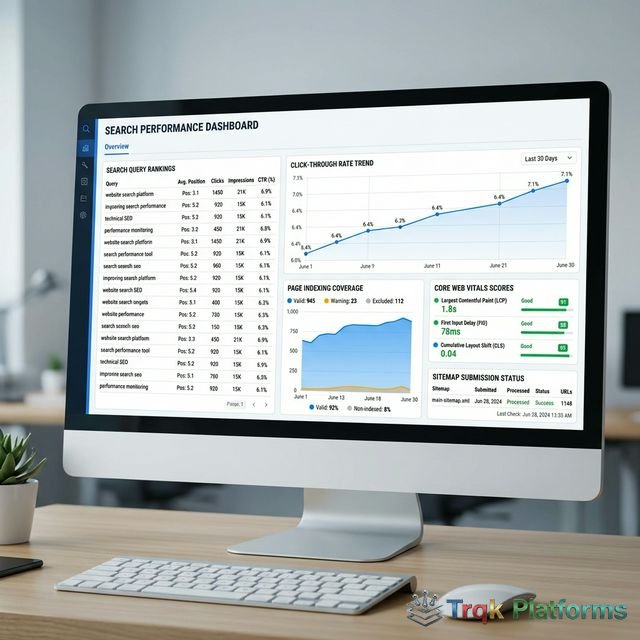
The Performance report is the most frequently used section of Google Search Console, providing detailed data about
how your website appears in Google Search results. The report displays four core metrics: Total Clicks (the number
of times users clicked on your search results), Total Impressions (the number of times your pages appeared in search
results), Average Click-Through Rate (CTR) (the percentage of impressions that resulted in clicks), and Average
Position (the average ranking position of your pages for all queries).
Performance data can be viewed across multiple dimensions:
| Dimension | What It Shows | Use Case |
|---|---|---|
| Queries | Search terms that triggered your results | Discover what users search to find you |
| Pages | Which pages appeared in search results | Identify top-performing and underperforming content |
| Countries | Geographic distribution of search traffic | Understand audience geography and localization needs |
| Devices | Desktop, mobile, or tablet traffic breakdown | Evaluate mobile optimization priorities |
| Search Appearance | Rich results, AMP, FAQ schemas, etc. | Track structured data and rich result performance |
| Dates | Performance trends over time (up to 16 months) | Identify trends, algorithm impacts, and seasonal patterns |
Using Performance Data Strategically
III. Index Coverage and URL Inspection
Pages Report (Index Coverage)
The Pages report (formerly Index Coverage report) provides detailed information about which pages Google has indexed,
which pages have been excluded from the index, and the reasons for any indexing issues. Pages are categorized into
four status types: Indexed pages are successfully indexed and may appear in search results, Not Indexed pages are
pages Google knows about but has chosen not to include in its index, with specific reasons provided (such as crawled
but not indexed, noindex tag detected, soft 404, redirect errors, or page with redirect), and Error pages have
indexing errors that prevent them from being processed correctly.
Understanding index coverage is critical because pages that are not indexed cannot appear in search results. Common
indexing issues include pages blocked by robots.txt, pages with noindex directives, duplicate content that Google
chooses not to index, pages that return server errors or redirect chains, and pages that Google considers
low-quality or thin content. The Pages report helps identify these issues systematically and provides specific URLs
affected by each issue type, enabling targeted resolution.
URL Inspection Tool
The URL Inspection tool provides detailed information about how Google sees a specific page on your website. For any
URL, the tool reports whether the page is indexed, when it was last crawled, the canonical URL Google has selected,
whether the page is mobile-friendly, any detected structured data and its validity, the HTTP response code returned
during the last crawl, and whether the page was indexed through the sitemap.
The tool also includes a “Request Indexing” feature that submits a URL to Google’s crawl queue, which is useful when
you have published new content or made significant updates to a page and want it discovered and indexed more quickly
than normal crawling cycles would achieve. Additionally, the Live Test feature crawls a page in real time and
displays the rendered HTML that Google sees, which is invaluable for debugging JavaScript rendering issues or
verifying that content is accessible to search engines.
IV. Sitemaps and Crawling
Sitemap Management
Google Search Console allows you to submit XML sitemaps that help Google discover and understand the structure of
your website. While Google can find pages through crawling links, sitemaps provide an explicit list of URLs that you
want indexed along with optional metadata about each URL including last modification date, change frequency, and
priority. GSC shows sitemap processing status, the number of URLs discovered through each sitemap, and any errors
encountered during sitemap parsing. Regularly reviewing sitemap status helps ensure that Google has access to all
important pages on your site.
Crawl Stats
The Crawl Stats report provides data about how Googlebot crawls your website, including crawl requests per day,
average response time of your server, and the total download size during crawling. This data helps identify server
performance issues that may slow down crawling, sudden changes in crawl frequency that could indicate technical
problems, and whether your server is handling Google’s crawl requests efficiently. The report also breaks down crawl
data by response type (successful, redirected, not found, server errors), file type (HTML, CSS, JavaScript, images),
and Googlebot type (smartphone, desktop).
V. Core Web Vitals and Page Experience
Core Web Vitals Report
Core Web Vitals are a set of user experience metrics that Google uses as ranking signals. The Core Web Vitals report
in GSC tracks three metrics based on real-user data collected from Chrome users: Largest Contentful Paint (LCP),
which measures loading performance and should occur within 2.5 seconds, Interaction to Next Paint (INP), which
measures interactivity and responsiveness to user input, and Cumulative Layout Shift (CLS), which measures visual
stability by tracking unexpected layout shifts during page loading.
The report categorizes URLs as Good, Needs Improvement, or Poor for each metric, and groups similar URLs together so
that issues affecting multiple pages with the same template can be identified and resolved efficiently. Core Web
Vitals are particularly important because they directly influence search rankings, and Google provides
recommendations for improving each metric.
Mobile Usability
The Mobile Usability report identifies pages that have mobile-specific usability issues including text that is too
small to read comfortably on mobile devices, clickable elements that are placed too close together, content that is
wider than the mobile screen, and pages that use incompatible mobile plugins. Given that mobile searches represent
the majority of web searches globally and Google uses mobile-first indexing, ensuring that all pages pass mobile
usability checks is essential for maintaining search visibility.
VI. Security and Manual Actions
Security Issues
GSC monitors your website for security issues that could harm visitors or damage your search visibility. If Google
detects malware, phishing content, hacked pages, or other security threats on your website, the Security Issues
report will display warnings with details about the affected pages and the type of threat detected. These
notifications are critical because security issues can result in Google displaying warnings to users who attempt to
visit your site, which dramatically reduces traffic and damages user trust.
Manual Actions
The Manual Actions report shows whether Google has applied any manual penalties to your website. Unlike algorithmic
filtering that happens automatically, manual actions are applied by Google’s human reviewers when they determine
that a website violates Google’s Webmaster Guidelines. Common reasons for manual actions include unnatural inbound
or outbound links, thin or low-quality content, cloaking or sneaky redirects, structured data violations, and
user-generated spam. If a manual action is applied, the report describes the issue and the scope of its impact, and
provides guidance for resolving the problem. After fixing the issue, website owners can submit a reconsideration
request through GSC.
Structured Data and Rich Results
Google Search Console includes reports for structured data (schema markup) implemented on your website. The Enhancements section shows validation results for various schema types including FAQ schema, How-To schema, Product schema, Review schema, Breadcrumb markup, Sitelinks Search Box, and other structured data formats. For each schema type, GSC reports the number of valid items, items with warnings, and items with errors, along with specific URLs affected by any issues. When structured data is correctly implemented, it can enable rich results in search-such as FAQ expandable sections, star ratings, recipe cards, event listings, and product information-which can significantly increase click-through rates by making your search listings more visually prominent and informative.
Links Report
The Links report provides data about both external links pointing to your website and internal links within your site. The external links section shows the top linked pages on your site, the top linking domains, and the most common anchor text used in external links. While this data is less comprehensive than dedicated backlink tools like Ahrefs or SEMrush, it is authoritative because it comes directly from Google and therefore represents the links that Google actually knows about and considers in its ranking algorithms. The internal links section shows how your pages link to each other, which can reveal pages with insufficient internal linking that may not be receiving adequate crawl attention or link equity distribution.
Removals Tool
The Removals tool provides temporary URL removal capabilities and information about SafeSearch filtering. Website owners can request temporary removal of URLs from Google Search results, which is useful when sensitive content has been accidentally published, when pages containing outdated or incorrect information need to be suppressed while permanent solutions are implemented, or when content has been removed from the website but cached versions continue to appear in search results. Temporary removals last approximately six months, during which time the underlying page should be permanently removed, redirected, or protected with a noindex directive to prevent the URL from reappearing in search results after the temporary removal expires.
VII. Strengths and Limitations
Strengths
- Completely free with no usage limits or premium tiers
- Provides authoritative first-party data directly from Google
- Search Performance report shows actual queries, clicks, and positions
- URL Inspection tool provides detailed page-level indexing diagnostics
- Core Web Vitals report tracks real-user page experience metrics
- Security monitoring protects against malware and hacking impacts
- Direct communication channel with Google regarding manual actions
- Integrates with Google Analytics for combined search and behavior data
- 16 months of performance data retention
Limitations
- Only shows data for Google Search—no data from Bing, Yahoo, or other search engines
- Data is limited to your own website—no competitor analysis capabilities
- Performance data may show sampling for sites with very large query volumes
- No keyword research or keyword difficulty features
- No backlink analysis beyond basic link reporting
- Data processing can have 2-3 day delays for some reports
- Limited to 1,000 rows in the interface (API provides more)
- No content optimization or writing assistance tools
VIII. Alternatives and Complementary Tools
Google Search Console occupies a unique position because it provides data that no other tool can replicate—actual
search query data and indexing status directly from Google. However, it works best when complemented with other SEO
tools that provide capabilities GSC lacks. SEMrush and Ahrefs provide competitor analysis, comprehensive keyword
research, and backlink analytics that extend beyond GSC’s own-site-only data. Bing Webmaster Tools provides
equivalent data for Microsoft’s Bing search engine, which handles a meaningful share of search traffic, particularly
in enterprise environments. Screaming Frog is a technical SEO crawler that provides more granular technical auditing
than GSC’s crawl reports, identifying issues at scale across all pages. Google Analytics complements GSC by
providing user behavior data after visitors arrive on your site, connecting search performance with on-site
engagement and conversion metrics. Most effective SEO workflows use GSC as the authoritative foundation for search
data and combine it with third-party tools for competitive intelligence, keyword research, and advanced technical
analysis.
IX. Conclusion
Google Search Console is an indispensable platform for anyone managing a website’s presence in Google Search. As the
only source of authoritative first-party search data directly from Google, GSC provides insights that no third-party
tool can replicate—including actual search queries that bring users to your site, precise indexing status of every
page, real-user Core Web Vitals data, and direct communication about security issues and manual actions. The
platform is entirely free, requires minimal technical setup, and provides data that forms the foundation of informed
SEO decision-making.
Whether you are a small business owner monitoring your website’s search visibility, an SEO professional managing
client campaigns, or a web developer ensuring technical search health, Google Search Console should be among the
first tools you set up and regularly consult. While it does not replace comprehensive paid SEO platforms for
competitive research and keyword strategy, it provides the ground truth about your own website’s search performance
that all other optimization efforts should be built upon.
About The Publisher

TRQK Platforms Editor
The TRQK Editorial Team meticulously investigates and evaluates the world's most powerful digital platforms. Our mission is to provide transparent, in-depth reviews that empower businesses to scale with the right technology.