Content marketing success depends not only on the quality of individual pieces of content but also on the
consistency, coordination, and strategic timing of content publication across channels. Marketing teams that publish
blog posts, social media updates, email campaigns, and other content types simultaneously need a central system to
plan, organize, and execute their content strategy. Without proper planning tools, content efforts often suffer from
missed deadlines, inconsistent publishing schedules, duplicated efforts, and poor cross-channel coordination that
diminishes the cumulative impact of marketing activities.
CoSchedule has established itself as one of the most recognized marketing calendar platforms, specifically designed
to address the organizational challenges of content marketing. Founded in 2013 by Garrett Moon and Justin Walsh in
Bismarck, North Dakota, CoSchedule began as a WordPress editorial calendar plugin and has since evolved into a
broader marketing organization platform. The company offers several products: the Marketing Calendar (a free and
paid calendar tool for marketing planning), the Marketing Suite (an enterprise-grade platform with project
management and workflow automation), and individual tools including the Headline Analyzer, Social Message Optimizer,
and Email Subject Line Tester that are freely accessible and widely used across the marketing industry.
This article provides a comprehensive overview of CoSchedule’s marketing calendar features, content planning tools,
social media scheduling capabilities, team collaboration features, pricing structure, strengths, and limitations.
The goal is to present a detailed, factual assessment to help you determine whether CoSchedule aligns with your
content planning and marketing organization needs.
I. Platform Overview and Product Architecture
Marketing Calendar
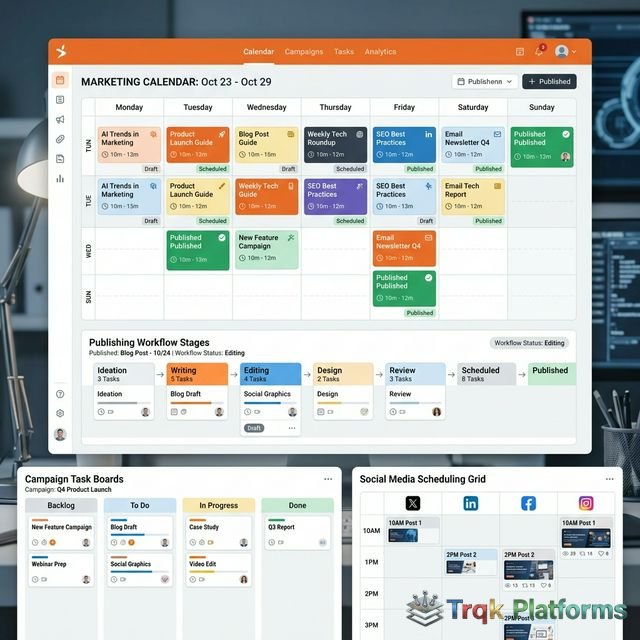
The Marketing Calendar is CoSchedule’s core product and the central interface for marketing planning and execution.
It provides a drag-and-drop calendar view that displays all scheduled marketing activities—blog posts, social media
messages, email campaigns, events, and custom project types—in a single unified timeline. Users can view the
calendar in daily, weekly, or monthly formats, filter by project type or team member, and quickly identify gaps or
conflicts in the content schedule.
The calendar supports color-coding by project type, making it visually intuitive to distinguish between blog content,
social campaigns, email sends, and other marketing activities. Each calendar entry can include detailed notes,
checklists, file attachments, team assignments, and status tracking. The drag-and-drop interface allows easy
rescheduling of any item, and the calendar automatically adjusts any associated social promotion schedules when a
parent project is moved to a new date.
Content Organizer
The Content Organizer provides a Kanban-style board view that complements the calendar view, allowing teams to manage
content through customizable workflow stages. Typical stages might include Idea, Writing, Editing, Design, Final
Review, and Published. Content moves through these stages as work progresses, providing visibility into the status
of every piece of content in the pipeline. This dual-view approach—calendar for timeline planning and Kanban board
for workflow management—addresses both the “when” and the “how” of content production.
II. Social Media Scheduling
Social Campaign Builder
CoSchedule includes social media scheduling tools that are deeply integrated with the content calendar. When users
create a blog post or content project, they can build a complete social promotion campaign within the same
interface. The Social Campaign builder allows creating multiple social messages for different platforms—Facebook,
Instagram, X (Twitter), LinkedIn, and Pinterest—and scheduling them at optimal intervals before and after the
content publication date.
A distinctive feature is CoSchedule’s ReQueue system, which automatically identifies and re-shares your
best-performing social content to fill gaps in the posting schedule. ReQueue maintains a library of evergreen
messages that are intelligently rotated based on engagement history and posting frequency settings. This automated
reposting feature ensures that high-performing content continues to reach new audience members without requiring
manual rescheduling. Users can set rules for each social profile, defining how frequently ReQueue should fill empty
time slots and which content categories to include in the rotation.
Best Time Scheduling
CoSchedule offers Best Time Scheduling, which analyzes historical engagement data across connected social profiles to
recommend optimal posting times for each social network. Rather than requiring users to research and manually set
posting times, this feature automatically suggests time slots when the audience is most likely to be active and
engaged. Users can accept the recommended times or override them with custom scheduling. The platform also supports
bulk social message creation and scheduling, which is useful for promoting events, product launches, or campaigns
that require multiple messages across channels.
Social Templates
Social Templates allow teams to create reusable promotion patterns that can be applied to new content projects. For
example, a team might create a “Blog Post Promotion Template” that automatically generates a series of social
messages: one post on publication day, a reminder post 3 days later, another share at the 1-week mark, and a final
post at the 1-month mark—each customized for different social platforms. When a new blog post is created, applying
this template instantly generates the complete social promotion schedule, saving significant time for teams that
follow consistent content promotion workflows.
III. Team Collaboration and Workflows
Task Management
Each marketing project in CoSchedule can include a detailed task list with assigned team members, due dates, and
completion tracking. Tasks can be organized as checklists within projects, and team members receive notifications
when tasks are assigned or due dates approach. The task management functionality provides accountability and ensures
that multi-step content production processes—such as writing, editing, design, review, and publication—stay on track
with clear ownership at each stage.
Team Communication
CoSchedule includes built-in commenting and discussion threads within each project, allowing team members to
communicate about specific content pieces without switching to external messaging tools. Comments can tag specific
team members, attach files, and maintain a chronological record of decisions and feedback related to each project.
This in-context communication reduces the fragmentation that occurs when content-related conversations are scattered
across email, chat apps, and project management tools.
Approval Workflows
Marketing Suite users have access to structured approval workflows that route content through designated reviewers
before publication. Content can require approval from one or multiple stakeholders, and the system tracks the
approval status of each piece of content. This feature is particularly important for organizations with compliance
requirements, multi-level review processes, or agency-client relationships where client approval is needed before
content goes live. Approval requests can include specific feedback prompts and deadline settings to keep the review
process moving efficiently.
IV. Analytics and Performance Tracking
Social Analytics
CoSchedule provides social media analytics that track the performance of published social messages, including
engagement metrics, click-through rates, and reach. The analytics dashboard shows which messages performed best,
which social networks generate the most engagement, and how social promotion contributes to traffic for associated
content projects. Performance data is available at both the individual message level and the campaign level,
providing insights into which promotion patterns and content types generate the strongest social media results.
Marketing Project Reports
The Marketing Suite includes project-level reporting that tracks team productivity metrics including project
completion rates, task completion times, content production volume, and team workload distribution. These
operational metrics help marketing leaders understand team capacity, identify bottlenecks in the content production
process, and make data-driven decisions about resource allocation and workflow optimization.
V. Free Tools and Integrations
Headline Analyzer and Optimization Tools
CoSchedule offers several free tools that are widely used independently of the main platform. The Headline Analyzer
evaluates blog post and article headlines based on word balance, sentiment, headline type, character count, and
other factors, providing an overall score and improvement suggestions. The Email Subject Line Tester applies similar
analysis to email subject lines, and the Social Message Optimizer helps craft more engaging social media messages.
These free tools have become popular across the marketing community and serve as entry points for users who may
later adopt the full CoSchedule platform.
Platform Integrations
CoSchedule integrates with a range of marketing and productivity tools. The WordPress integration allows users to
plan, create, and schedule blog posts directly from the CoSchedule calendar, with changes syncing between both
platforms. Email marketing integrations with Mailchimp, Constant Contact, Campaign Monitor, and ActiveCampaign
enable scheduling email campaigns within the same calendar as other marketing activities. Additional integrations
include Google Docs and Google Analytics for content creation and performance tracking, Evernote for idea capture
and note integration, Zapier for connecting with hundreds of other applications through workflow automation, and
various team communication tools for notifications and updates.
VI. Pricing Structure
CoSchedule offers multiple pricing options as of early 2026:
| Product | Price | Best For |
|---|---|---|
| Free Calendar | $0 | Individuals needing basic marketing calendar view |
| Social Calendar | ~$29/user/month | Social media scheduling with calendar planning |
| Content Calendar | ~$39/user/month | Blog and social content planning with integrations |
| Marketing Suite | Custom pricing | Enterprise teams needing full workflow automation and project management |
CoSchedule’s free calendar provides a basic but functional planning tool that can be useful for solo marketers or
very small teams. The paid calendar tiers add social publishing, ReQueue automation, integrations, and team
collaboration features. The Marketing Suite is priced for enterprise teams and includes advanced features like
workflow automation, asset management, and comprehensive team analytics that go beyond what the calendar products
offer.
Pricing accurate as of early 2026 — verify current rates on the official CoSchedule website.
Asset Organizer and Digital Asset Management
The Marketing Suite includes an Asset Organizer that serves as a centralized digital asset management system for marketing teams. The organizer stores, catalogs, and manages marketing assets including images, graphics, documents, brand guidelines, templates, and any files that teams use repeatedly in their marketing workflows. Assets can be tagged, organized into folders, and searched using keyword filters, ensuring that team members can quickly find the right assets for their projects without digging through email attachments, shared drives, or scattered cloud storage folders.
The asset management capability is particularly valuable for teams that need brand consistency across multiple content creators and channels. By maintaining a single source of truth for approved brand assets, logos, images, and templates, the Asset Organizer reduces the risk of team members using outdated or incorrect assets in their marketing materials. Assets can be linked directly to calendar projects and tasks, creating a seamless workflow from asset storage to content creation and publication.
Content Types and Custom Project Management
CoSchedule allows teams to define custom content types beyond the default categories of blog posts, social messages, and email campaigns. Custom content types might include podcast episodes, video productions, webinars, press releases, advertising campaigns, event planning, product launches, or any other marketing activity that a team needs to track on the calendar. Each custom content type can have its own color coding, default task templates, and workflow stages, enabling the calendar to reflect the full scope of marketing activity regardless of the channels or formats involved.
The ability to define custom project types with their own task templates is especially useful for teams that follow repeatable processes for specific content formats. For example, a video production project type might include default tasks for scriptwriting, filming, editing, thumbnail creation, uploading, and social promotion. When a new video project is created, these tasks are automatically generated with appropriate assignments and deadlines, ensuring that the team follows a consistent production process every time without having to manually set up the task list from scratch.
Marketing Performance Measurement
Beyond social analytics, CoSchedule’s Marketing Suite provides marketing performance dashboards that track the overall productivity and output of the marketing team. Metrics include the volume of published content across all channels, project completion rates and on-time delivery percentages, team utilization and workload balance, campaign performance against stated goals, and trending activity data that helps identify whether the team’s marketing velocity is increasing or decreasing over time. These operational intelligence metrics help marketing leaders justify resource allocation, identify capacity constraints before they become bottlenecks, and demonstrate the team’s productivity to organizational stakeholders. The ability to connect marketing output metrics with engagement and performance data provides a more complete picture of marketing effectiveness than either operational data or engagement data alone.
VII. Strengths and Limitations
Strengths
- Unified calendar view consolidates all marketing activities in one place
- Deep WordPress integration for blog content management
- ReQueue automatically fills scheduling gaps with proven content
- Social Templates save time by reusing promotion patterns
- Free tools (Headline Analyzer, Subject Line Tester) provide standalone value
- Content Organizer Kanban board complements calendar for workflow tracking
- Built-in task management keeps multi-step projects on track
- Free calendar tier provides a useful entry point
- Clean, focused interface designed specifically for marketing teams
Limitations
- Social media analytics are less comprehensive than dedicated social management platforms
- No built-in social listening or engagement monitoring features
- Advanced workflow features require the enterprise-priced Marketing Suite
- Per-user pricing can become costly for larger teams
- Limited direct publishing support compared to dedicated social media tools
- No built-in email creation tools—relies on integrations with email platforms
- Analytics focus on operational metrics rather than deep audience insights
- The platform is most valuable when WordPress is the primary content platform
VIII. Alternatives to Consider
The marketing calendar and content planning space includes several alternatives worth evaluating. Trello and Asana
can be adapted for editorial calendar use through custom boards and templates, though they lack CoSchedule’s
marketing-specific features like social scheduling and ReQueue. Monday.com offers more advanced project management
capabilities with marketing templates. ContentCal (now acquired by Adobe) provides social media planning with an
emphasis on visual content calendars. Notion offers a highly flexible workspace that can be configured as a content
calendar with databases and views, though it requires manual setup. Airtable provides a database-style approach to
content tracking with customizable views and automations. The right choice depends on whether you need a
marketing-specific tool with social scheduling built in or whether a more general project management platform
adapted for marketing use would better serve your team’s broader needs.
Each alternative platform offers its own approach to content organization and marketing coordination, and many marketing teams find that the ideal solution depends on whether they need a marketing-specific tool with built-in social scheduling or whether a more general project management framework adapted with custom templates better serves their broader organizational requirements. Teams heavily invested in WordPress-based content workflows may find CoSchedule’s native integration particularly compelling, while teams that need social media management as a primary concern rather than a secondary feature may prefer dedicated social management platforms.
IX. Conclusion
CoSchedule has carved out a distinctive position in the marketing tools landscape by focusing specifically on the
organizational challenge of marketing coordination. Rather than competing directly with social media management
platforms or comprehensive marketing automation suites, CoSchedule provides a central planning hub where all
marketing activities—blog posts, social campaigns, emails, events, and custom projects—come together in a single
visual calendar.
The platform delivers the most value for content-driven marketing teams that publish regularly across blogs and
social media channels, particularly those using WordPress as their primary content management system. The
combination of calendar-based planning, integrated social scheduling with ReQueue automation, team task management,
and workflow tracking addresses the specific operational challenges that marketing teams face in maintaining
consistent, coordinated content output. For marketers evaluating content planning tools, CoSchedule’s free calendar
tier provides a practical starting point for testing whether its approach to marketing organization fits your team’s
workflow.
About The Publisher

TRQK Platforms Editor
The TRQK Editorial Team meticulously investigates and evaluates the world's most powerful digital platforms. Our mission is to provide transparent, in-depth reviews that empower businesses to scale with the right technology.