Visual content has become one of the most influential elements in digital marketing. From social media posts and
email headers to presentations, infographics, and advertisements, the quality and consistency of visual branding
directly impacts how audiences perceive a business. Traditionally, creating professional-quality marketing materials
required dedicated graphic designers using complex software like Adobe Photoshop, Illustrator, or InDesign. While
these tools remain industry standards for advanced design work, they present significant barriers for marketing
teams, small business owners, and content creators who need to produce visual content quickly and frequently without
extensive design training.
Canva has emerged as one of the most widely adopted design platforms in the world, addressing this gap with a
browser-based, drag-and-drop design tool that makes visual content creation accessible to users without professional
design backgrounds. Founded in 2013 by Melanie Perkins, Cliff Obrecht, and Cameron Adams in Sydney, Australia, Canva
has grown to serve over 170 million monthly active users across 190 countries. The platform offers a free tier
alongside two paid plans—Canva Pro for individuals and small teams, and Canva for Teams (formerly Canva Enterprise)
for larger organizations that need brand management, collaboration, and administrative controls.
This article examines Canva’s business-focused features in detail, covering its design tools, brand management
capabilities, template ecosystem, team collaboration features, pricing structure, strengths, and limitations. The
goal is to provide a thorough, factual overview that helps you evaluate whether Canva aligns with your
organization’s design and marketing material production needs.
I. Platform Overview and Design Interface
Core Design Experience
Canva operates primarily as a web-based application, though native apps are available for Windows, macOS, iOS, and
Android. The design editor uses a drag-and-drop interface where users place and arrange elements on a canvas that
can be set to any custom dimension or selected from hundreds of pre-configured sizes optimized for specific use
cases. These preset dimensions include social media post sizes for platforms like Instagram, Facebook, LinkedIn,
Pinterest, and X (Twitter), as well as presentation slides, business cards, flyers, posters, letterheads, resume
formats, YouTube thumbnails, and more.
The editor provides tools for adding and editing text (with access to hundreds of fonts including Google Fonts and
premium typefaces), inserting shapes, lines, and icons, uploading and positioning images, applying filters and photo
effects, using background removal tools, adding animations for digital formats, and arranging elements using
alignment guides, grids, and spacing tools. While Canva does not offer the pixel-level precision of professional
design software, its tools are more than sufficient for producing clean, professional marketing materials
efficiently.
Content Library
One of Canva’s most significant advantages is its massive content library. The platform provides access to over 100
million stock photos, videos, audio tracks, graphics, illustrations, icons, and design elements. Free users have
access to a substantial portion of this library, while Canva Pro and Teams subscribers gain access to the full
premium library, which includes higher-quality stock imagery, premium icons and illustrations, and exclusive graphic
elements. This built-in content library eliminates the need for separate stock photo subscriptions for many users,
potentially representing significant cost savings compared to purchasing stock imagery from dedicated providers like
Shutterstock, Adobe Stock, or iStock.
II. Brand Management Tools
Brand Kit
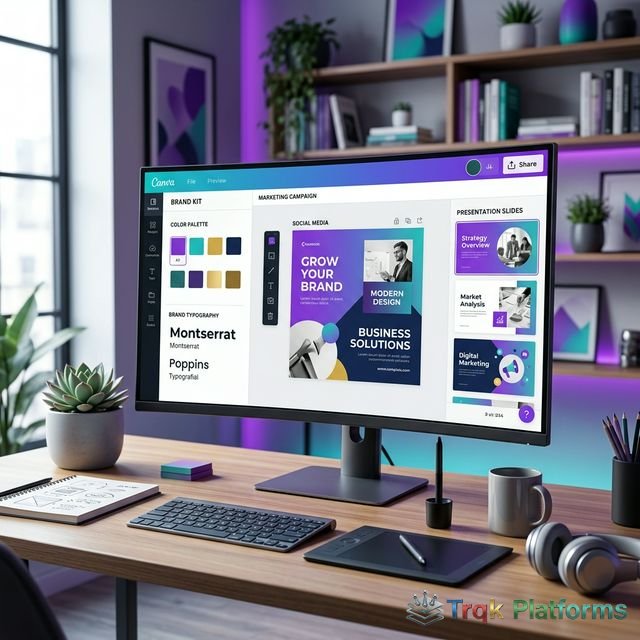
The Brand Kit feature, available on Canva Pro and Teams plans, allows organizations to define and store their brand
identity elements within the platform. A Brand Kit can include brand colors (stored as hex codes and accessible as a
custom palette throughout the editor), brand fonts (both from Canva’s library and uploaded custom fonts), brand
logos in various formats and orientations, brand icons and graphic elements, and brand voice guidelines. When team
members create new designs, they can access the Brand Kit directly from the editor panel, ensuring that all
materials use the correct colors, fonts, and logos without needing to reference external brand guidelines documents.
Canva for Teams supports multiple Brand Kits within a single account, which is particularly useful for agencies
managing visual identities for multiple clients or for organizations with sub-brands that each have their own visual
standards. The Brand Kit serves as a centralized brand asset library that keeps everyone aligned on visual identity
standards.
Brand Templates and Locked Elements
Teams can create branded templates that establish the structural framework and design standards for common marketing
materials. Template creators can lock specific elements—such as the logo position, brand colors, or footer
content—so that when team members use the template, they can customize the content areas while being unable to
modify the locked brand elements. This approach balances creative flexibility for content customization with brand
consistency enforcement, reducing the risk of off-brand designs being produced by team members who may not be deeply
familiar with brand guidelines.
III. Template Ecosystem
Pre-Designed Templates
Canva offers hundreds of thousands of professionally designed templates across virtually every marketing and business
use case. Major template categories include social media posts and stories for all major platforms, presentation
decks for business meetings and pitches, email headers and newsletter layouts, brochures, flyers, and print
marketing materials, business proposals and reports, infographics and data visualizations, video introductions and
social video content, website wireframes and mockups, resume and portfolio designs, and invitation and event
materials.
Each template is fully customizable—users can modify text, swap images, change colors, rearrange elements, add or
remove sections, and adapt the template to their specific content needs. Templates are designed by Canva’s in-house
design team and external contributors, with new templates added regularly to reflect current design trends and
emerging platform formats like Instagram Reels covers, TikTok video templates, and LinkedIn carousel posts.
Magic Design and AI Features
Canva has integrated several AI-powered features into its platform. Magic Design generates complete design options
based on a user-uploaded image or text prompt, creating multiple layout variations that the user can then customize.
Magic Write provides AI-assisted text generation for creating content within designs, including headlines, social
media captions, and short-form copy. Magic Eraser removes unwanted elements from photos, Magic Edit allows
AI-powered photo modifications through text descriptions, and Background Remover instantly removes image
backgrounds—a feature that previously required manual editing in advanced photo software.
Text to Image generates original illustrations and graphics from text descriptions, which can be useful for creating
unique visual elements when stock imagery does not adequately represent the desired concept. While these AI features
are convenient, they should be used with awareness that AI-generated content may require review for accuracy and
brand appropriateness.
IV. Team Collaboration Features
Real-Time Collaboration
Canva supports real-time collaborative editing, allowing multiple team members to work on the same design
simultaneously—similar to how Google Docs handles collaborative documents. Team members can see each other’s
cursors, make edits in real time, leave comments on specific design elements, tag teammates for feedback, and
resolve comments as design issues are addressed. This collaborative workflow is particularly valuable for marketing
teams that need to review and iterate on designs without sending files back and forth via email or other
communication tools.
Approval Workflows
Canva for Teams includes design approval workflows that allow designated approvers to review, comment on, and
formally approve or request changes to designs before they are finalized or published. This feature helps ensure
that marketing materials go through proper review before distribution, which is important for maintaining brand
consistency and catching potential errors or messages that do not align with organizational standards.
Folders and Organization
Designs can be organized into folders and projects, with customizable access permissions controlling who can view,
edit, or share specific assets. Teams can create shared folders for different departments, campaigns, or clients,
ensuring that team members can find and reuse existing designs and brand assets efficiently. The search
functionality also helps locate designs by name, type, or the content within them.
V. Publishing and Export Options
Direct Publishing
Canva integrates with several platforms for direct publishing and scheduling. Users can publish social media posts
directly to Facebook, Instagram, LinkedIn, Pinterest, X (Twitter), and Tumblr from within the Canva interface. The
Content Planner feature allows scheduling posts for future publication and provides a calendar view of planned
content. While this scheduling functionality is more basic than dedicated social media management platforms, it can
be sufficient for users who want a streamlined workflow from design creation to social posting without switching
between tools.
Export Formats and Print
Designs can be exported in multiple formats including PNG, JPG, PDF (standard and print-ready), SVG (Pro and Teams
plans), MP4 (for animated and video designs), and GIF. The print-ready PDF export includes crop marks and bleed
settings for professional printing. Canva also offers an integrated print-and-ship service for business cards,
flyers, brochures, postcards, invitations, and other printed materials. Users can order prints directly through the
platform, with Canva handling production and shipping. This end-to-end workflow from design to print fulfillment can
be convenient for small businesses that need printed materials without managing separate printing vendor
relationships.
Presentations and Documents
Beyond traditional marketing materials, Canva has expanded significantly into the presentation and document space. Canva Presentations allows users to create professional slide decks with animations, transitions, speaker notes, and presenter view functionality. Presentations can be delivered directly from the Canva platform, exported as PowerPoint files for compatibility with Microsoft Office workflows, or shared via link for remote viewing. Canva Docs provides a combined document and design editor that enables teams to create visually rich documents, proposals, and reports that incorporate graphics, charts, and brand elements seamlessly within the text flow.
Canva Whiteboards offer an infinite canvas for brainstorming, planning, and visual collaboration. Teams can use sticky notes, shapes, connectors, and drawing tools to map out ideas, create flowcharts, or plan content strategies collaboratively. These expanded capabilities position Canva beyond a simple graphic design tool into a more comprehensive visual communication platform that can support a wider range of business workflows including meeting preparation, project planning, and internal communications.
Video Creation Tools
Canva includes a built-in video editor that supports creating short videos, social media video content, video presentations, and animated graphics. The video editor provides timeline-based editing with the ability to trim clips, add transitions, insert text overlays and graphics, apply animations, and incorporate background music from Canva’s audio library. While not a replacement for professional video editing software, Canva’s video tools are sufficient for creating marketing videos, social media reels, product demos, and short promotional content without requiring separate video editing applications or additional subscriptions.
Website and Landing Page Builder
Canva has also introduced basic website and landing page creation capabilities. Users can design single-page websites and simple multi-page sites using Canva’s template-based editor, with the option to publish directly to a Canva-hosted domain or connect a custom domain. While this feature does not compete with dedicated website builders in terms of functionality, interactive elements, or SEO capabilities, it can be useful for creating simple promotional landing pages, portfolio sites, link-in-bio pages, or event information pages without needing a separate website platform. The website builder integrates with the same design tools and brand assets available throughout the Canva platform, maintaining visual consistency with other marketing materials.
Canva also offers integration with many popular marketing and productivity tools. Connections are available with platforms including Slack for sharing designs within team channels, Google Drive and Dropbox for cloud file management, HubSpot and Mailchimp for inserting Canva-designed images directly into email campaigns, WordPress for publishing blog images, and various social media scheduling tools. These integrations help Canva fit into existing marketing technology stacks rather than operating as an isolated design tool, making it easier for teams to incorporate visual content creation into their broader marketing workflows without disrupting established processes.
VI. Pricing Structure
Canva offers three main pricing tiers as of early 2026:
| Plan | Price | Users | Key Features |
|---|---|---|---|
| Canva Free | $0 | 1 | 250,000+ templates, basic stock library, 5GB storage |
| Canva Pro | ~$15/month | 1 | Full premium library, Brand Kit, Background Remover, 1TB storage |
| Canva for Teams | ~$10/user/month | 3+ (minimum) | All Pro features, team collaboration, brand controls, approval workflows |
Canva’s free plan is notably generous, providing access to hundreds of thousands of templates, a substantial stock
content library, and core editing features. For many individuals and very small businesses, the free tier may be
sufficient for basic design needs. The Pro plan adds the premium content library, advanced features like Background
Remover and Magic Resize (which automatically reformats a design for different dimensions), and significantly more
storage. Canva for Teams adds multi-user collaboration, brand management controls, and administrative features.
Pricing accurate as of early 2026 — verify current rates on the official Canva website.
VII. Strengths and Limitations
Strengths
- Extremely accessible interface with minimal learning curve
- Massive template library covering virtually every marketing format
- Extensive built-in stock photo and graphic element library
- Generous free tier with substantial functionality
- Brand Kit ensures visual consistency across team designs
- Real-time collaboration enables efficient team design workflows
- Cross-platform availability (web, desktop, and mobile apps)
- Regular feature updates including AI-powered design tools
- Integrated print-and-ship service for physical materials
- Magic Resize reformats designs for multiple platforms instantly
Limitations
- Limited precision compared to professional design tools like Adobe Creative Suite
- Advanced typography and layout controls are less sophisticated
- Vector editing capabilities are basic compared to dedicated vector tools
- Photo editing features do not match dedicated photo editing software
- Designs can look similar when using popular templates without extensive customization
- Some AI features consume usage credits that may be limited on certain plans
- The platform requires internet connectivity for most features
- Export options for advanced file formats used in professional print workflows may be limited
VIII. Alternatives to Consider
The design platform space includes several alternatives that may better suit specific needs depending on your design
complexity requirements and budget. Adobe Express (formerly Adobe Spark) offers a similar template-based design
experience integrated with the Adobe Creative Cloud ecosystem, making it a natural choice for teams already using
other Adobe tools. Figma is a professional collaborative design tool more suited for UI/UX design and advanced
layout work, though its learning curve is significantly steeper than Canva’s. Visme combines presentation,
infographic, and document design with data visualization tools, making it popular for report and proposal creation.
Piktochart specializes in infographic and simple visual content creation. For teams needing more advanced design
capabilities while maintaining template-based workflows, tools like Lucidpress (now Marq) offer brand templating
with more sophisticated layout controls. Each alternative has its own strengths, and the right choice depends on
whether you prioritize ease of use, design precision, collaboration features, or integration with existing design
workflows.
IX. Conclusion
Canva for Business has democratized visual content creation, making it possible for marketing teams, small business
owners, and individual creators to produce professional-quality marketing materials without requiring graphic design
expertise or expensive software licenses. The platform’s combination of an intuitive drag-and-drop editor, extensive
template library, built-in stock content, brand management tools, and team collaboration features addresses the
practical reality that most businesses need visual content produced quickly and consistently across multiple formats
and channels.
For organizations evaluating Canva, the platform offers the most value when the primary need is producing everyday
marketing and business materials—social media posts, presentations, flyers, email graphics, and similar content—at
scale and speed. Professional design teams working on complex branding projects, detailed print layouts, or advanced
digital design may find Canva’s tools limiting compared to professional design software. However, even in these
organizations, Canva can serve as a complementary tool that empowers non-design team members to create routine
marketing materials independently, freeing professional designers to focus on higher-complexity creative work.
About The Publisher

TRQK Platforms Editor
The TRQK Editorial Team meticulously investigates and evaluates the world's most powerful digital platforms. Our mission is to provide transparent, in-depth reviews that empower businesses to scale with the right technology.